Intro
Use a system with at least 1 core and 1 GB of RAM. 1 GB of memory may cause issues when compiling the frontend.
We recommend a modern Linux distribution such as Ubuntu. Systems like CentOS 7 may fail to deploy because they cannot install a recent enough version of Node.js.
Backend Deployment
Installing Docker
If your server is in China, we recommend using Alibaba Cloud's mirror accelerator. The installation command is:
curl -fsSL https://get.docker.com | bash -s docker --mirror Aliyun
If your server is overseas, you can install it directly with the official script:
curl -fsSL https://get.docker.com | bash -s docker
If Docker and Docker Compose were installed successfully, you can check their versions with:
docker -v
docker compose version
Deployment
- Pull the config file
cd && mkdir -p $HOME/mx-space/core && cd $_ # 拉取 docker-compose.yml 文件
wget https://fastly.jsdelivr.net/gh/mx-space/core@master/docker-compose.yml
- Create the environment variables
vi .env
- After filling in the following, press
ESC, type:wq, then save and exit
Start the backend
BASHdocker compose up -d
Frontend Deployment
Prerequisites
- Deploy and start the backend
- Sign up for a Clerk account and get your public and private keys: see
- Install Node.js and pnpm
Deployment
- Clone the repository (using Shiro as an example)
git clone https://github.com/Innei/Shiro $HOME/mx-space/Shiro && cd $HOME/mx-space/Shiro
- Set up the environment variables
vi .env
After filling in the following, press ESC, type :wq, then save and exit:
NEXT_PUBLIC_API_URL=https://yourdomain/api/v2
NEXT_PUBLIC_GATEWAY_URL=https://yourdomain
NEXT_PUBLIC_CLERK_PUBLISHABLE_KEY=pk_test_XXXX
CLERK_SECRET_KEY=sk_test_XXXX
- Install dependencies and start the frontend
sudo pnpm i
sudo pnpm build
npx next start -p 2323
- If the frontend starts successfully with the steps above, you can deploy it with pm2
npm install -g pm2
pm2 start #
pm2 restart 0 #重新编译后用此命令重新部署,其中 0 为任务号
Nginx Reverse Proxy
Point your domain to the server.
Apply for a certificate as described in this article.
Set up the reverse proxy:
BASHvi /etc/nginx/nginx.confEdit the domain and certificate paths in the example below, then add it to the configuration file:
Updating
Backend update (Docker deployment)
Enter the core folder, then
cd $HOME/mx-space/core
docker compose pull && docker compose up -d
Frontend update
cd $HOME/mx-space/Shiro
git pull
sudo pnpm i
sudo pnpm build
pm2 restart 0
Troubleshooting
Fixing comment user conflicts
- Get the PEM: https://clerk.com/docs/backend-requests/handling/manual-jwt
- Get the ID: after logging in with Clerk in Shiro, capture the request from the console.
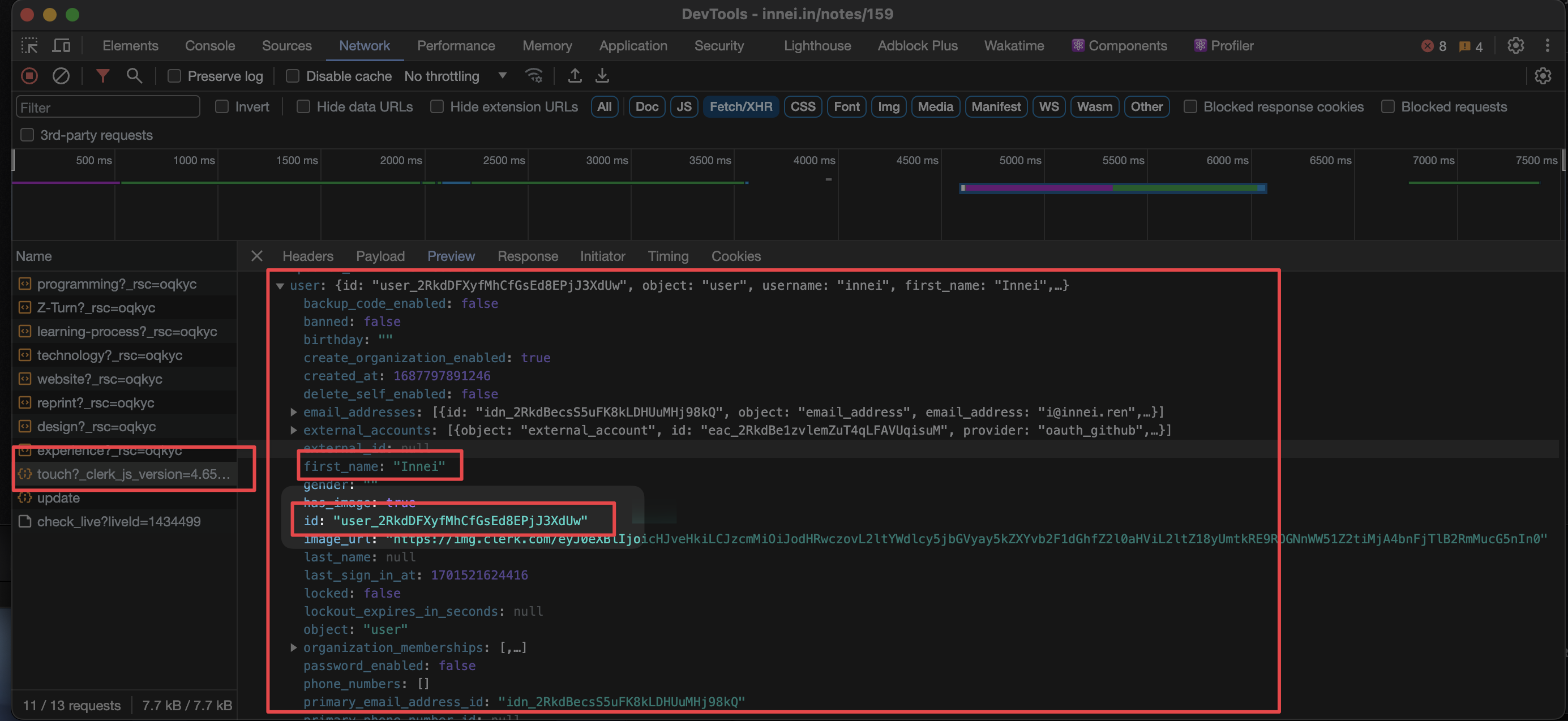
Get the ID
Adding Search
- Sign up: https://dashboard.algolia.com/users/sign_up
- New Application -> Create Application -> Create Index. Remember the index you created.
- API Keys -> Application ID & Admin API Key
- Enter the Index, Application ID, and Admin API Key in the admin dashboard.