Install Node.js
BASH
# installs NVM (Node Version Manager)
curl -o- https://raw.githubusercontent.com/nvm-sh/nvm/v0.39.7/install.sh | bash
# You need to reopen the shell or source .bashrc to make the environment avaliable

# download and install Node.js
nvm install 20

# verifies the right Node.js version is in the environment
node -v # should print `v20.12.1`

# verifies the right NPM version is in the environment
npm -v # should print `10.5.0`
Getting Started
Clone the repository:
BASHgit clone https://github.com/malaaaaaa/pikpak_scripts && cd pikpak_scriptsChange the invite code in main.js to your own invite code:
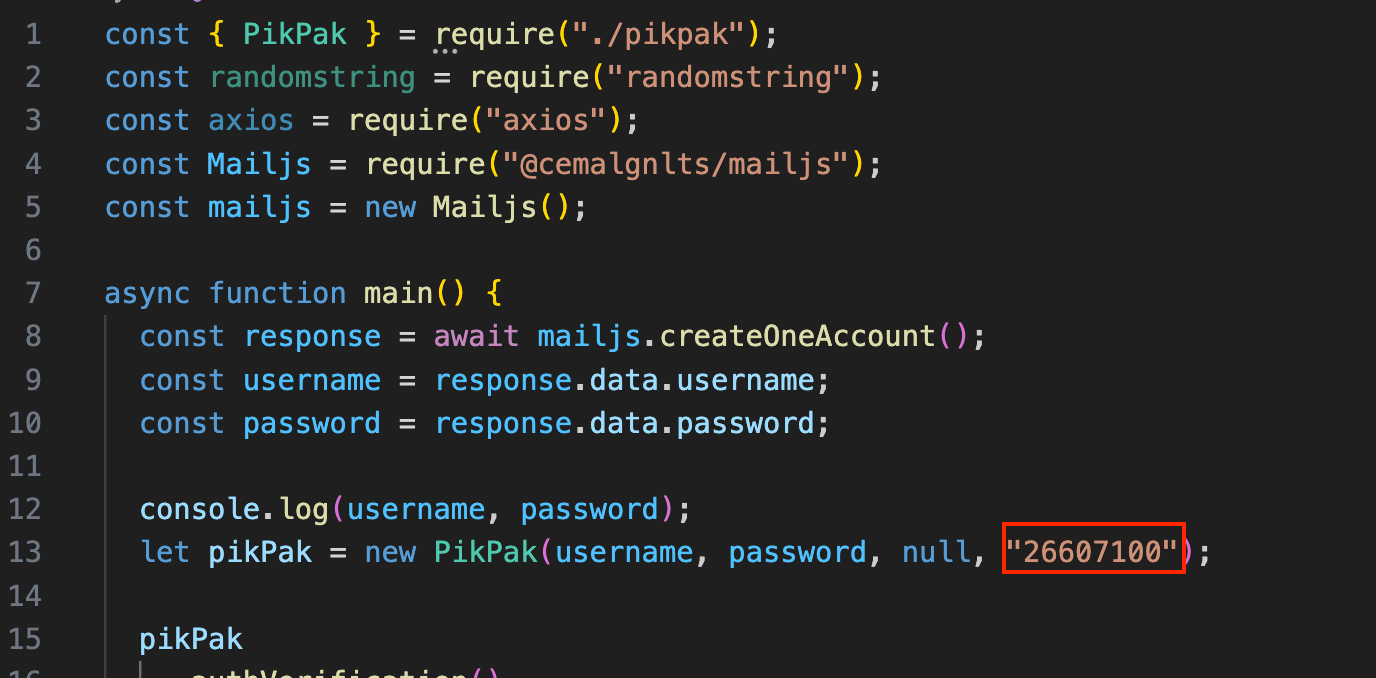
修改邀请码Try running it:
BASHnpm i #安装依赖 node main.js #运行If all goes well, you should see your invite count increase by 1.
Scheduled Runs
Even though this is all free, don't get too greedy. The first invite gives 5 days, and every invite after that gives 2 days, so running the script once a day is plenty.
- First, find your Node.js path:
BASH
which node
/root/.nvm/versions/node/v20.12.1/bin/node
- Then write a cron rule to suit your needs. This one runs every day at 7:49:
crontab -e
49 7 * * * /root/.nvm/versions/node/v20.12.1/bin/node /root/pikpak_scripts/main.js >> /root/pikpak_scripts/cron.log 2>&1
- If invites stop showing up later, check the
/root/pikpak_scripts/cron.logfile.
Wrap-Up
PikPak is genuinely a great cloud drive. If you can, consider supporting it.